Selling fast!
Get yours while you can.
Your cart is empty :(
Continue shopping
4xJournal Vol.3
OUT NOW!
Your cart
Estimated total:
$0.00 NZD
DMHUD01
Couldn't load pickup availability
Disclaimer: It is the purchaser’s responsibility to ensure all products and the installation thereof meet current LVV requirements, where applicable.
Dynomotive H.U.D
Includes:
1x Dynomotive Heads Up Display - DMHUD01
Details:
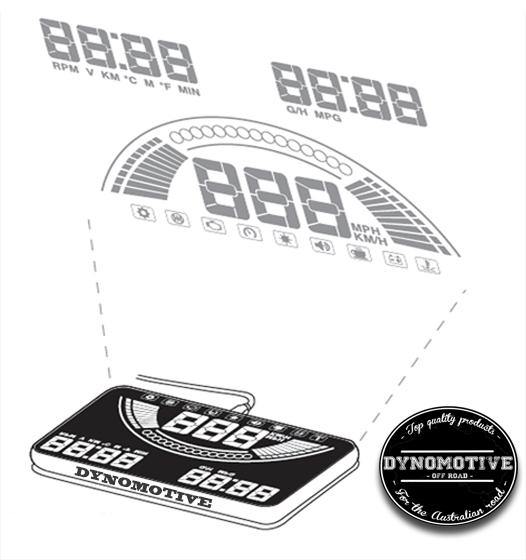
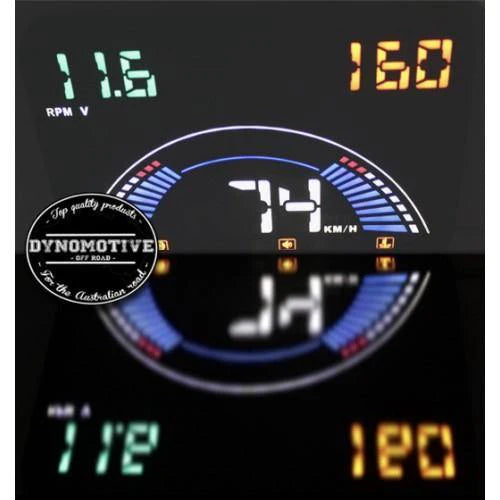
HUD is short for Head-Up Display. Displays driving data on the front windshield such as speed, rpm, fuel consumption, water temperature, and voltage; avoiding drivers’ unsafety because of watching the instrument while driving. Drivers can read the information, and can always keep their eyes on the road.
HUD Main Functions & Features:
- Combine OBD &GPS HUD systems into one.
- Up to 20 kinds of functional data.
- Screen size 5.8 Inch HD display.
- Auto power on/off.
- Automatic and manual brightness adjustment modes.
OBDII Main Functions:
- RPM, voltage, driving distance, water temperature, and driving time.
- Fuel consumption, water temperature, voltage.
- RPM unit, voltage unit. (v)
- Driving distance unit. (km)
- Water temperature unit. (c)
- Code Reader / Clearer
- Fuel consumption unit(L/H, L/100km)
- Vehicle speed
- Speed unit(KM/H, MPH)
- Display icon (from left to right): menu setting, shift reminder, engine fault code, over-speed icon, light sensor, buzzer mark, fatigue driving, low voltage alarm, high water temperature alarm
GPS Main Functions:
- Driving distance & time.
- Driving directions.
- Clock.
- Driving distance unit(KM).
- Driving time unit(MIN).
- Voltage unit.
- Satellite states.
- Speed icon.
- Vehicle speed.
Engine fault code clearance:
When the HUD connects to the car, switch the key to on but please ensure you don't start the car. Wait for the HUD to shutdown, then press the wave button for 5 seconds. You will hear a beep sound from the HUD, which means the fault codes have been cleared.
HUD setting:
Since HUD displays data getting from ECU, ECU data may be slightly different from vehicle dashboard data. This can be adjusted, you can enter into the menu setting to have a fine adjustment of HUD to get the same data as a dashboard.
| Make | Model | Years |
|---|---|---|
| UNIVERSAL | UNIVERSAL |
We're happy to help.

Selling fast!
Get yours while you can.
Trundles and this website are not affiliated with, endorsed by, or associated with Toyota. All trademarks, service marks, and logos used on this website are the property of their respective owners. The mention of Toyota on this website is solely for informational purposes and does not imply any partnership, sponsorship, or affiliation.
Dynomotive H.U.D
Includes:
1x Dynomotive Heads Up Display - DMHUD01
Details:
HUD is short for Head-Up Display. Displays driving data on the front windshield such as speed, rpm, fuel consumption, water temperature, and voltage; avoiding drivers’ unsafety because of watching the instrument while driving. Drivers can read the information, and can always keep their eyes on the road.
HUD Main Functions & Features:
- Combine OBD &GPS HUD systems into one.
- Up to 20 kinds of functional data.
- Screen size 5.8 Inch HD display.
- Auto power on/off.
- Automatic and manual brightness adjustment modes.
OBDII Main Functions:
- RPM, voltage, driving distance, water temperature, and driving time.
- Fuel consumption, water temperature, voltage.
- RPM unit, voltage unit. (v)
- Driving distance unit. (km)
- Water temperature unit. (c)
- Code Reader / Clearer
- Fuel consumption unit(L/H, L/100km)
- Vehicle speed
- Speed unit(KM/H, MPH)
- Display icon (from left to right): menu setting, shift reminder, engine fault code, over-speed icon, light sensor, buzzer mark, fatigue driving, low voltage alarm, high water temperature alarm
GPS Main Functions:
- Driving distance & time.
- Driving directions.
- Clock.
- Driving distance unit(KM).
- Driving time unit(MIN).
- Voltage unit.
- Satellite states.
- Speed icon.
- Vehicle speed.
Engine fault code clearance:
When the HUD connects to the car, switch the key to on but please ensure you don't start the car. Wait for the HUD to shutdown, then press the wave button for 5 seconds. You will hear a beep sound from the HUD, which means the fault codes have been cleared.
HUD setting:
Since HUD displays data getting from ECU, ECU data may be slightly different from vehicle dashboard data. This can be adjusted, you can enter into the menu setting to have a fine adjustment of HUD to get the same data as a dashboard.